
Your editor. Your tools. Your formatting rules.
Format code inside Notepad++ with Prettier, Ruff and clang-format, project-aware settings, and one-step undo.


English · 简体中文
Get started · Languages · Usage · Troubleshooting · Build & contribute
Inspired by Formatter for Sublime Text, NppFormatter is building toward a configurable home for formatting and text transformation tools in Notepad++. NppFormatter integrates Prettier, Ruff and clang-format.
Current scope: version 0.4.0 formats whole documents with Prettier, Ruff or clang-format: 16 built-in Prettier choices, 7 optional Prettier languages, Python through Ruff, and C/C++ through clang-format, with independent environment checks. You install the external tools yourself; the plugin neither bundles nor installs Node.js, Prettier, Ruff, clang-format, or language packages. More adapters and text transformations are on the roadmap.
| What you need | What the plugin does |
|---|---|
| Consistent formatting across a project | Reads Prettier configuration, EditorConfig, and the nearest .prettierignore for saved files |
| A quick cleanup without leaving the editor | Formats the current buffer, including unsaved edits, and maps the caret into the result |
| An easy way back | Applies changes in one undo step; unchanged output adds no undo entry |
| Control over your tools | Uses your chosen Node.js, Prettier, Ruff and clang-format installations, with separate Auto-detect buttons |
| Help with pasted or mixed-language content | Offers document language selection, a one-time override, and explicit recovery after parser errors |
| A responsive editor | Runs formatting in the background and discards results when the document or editing state changes |
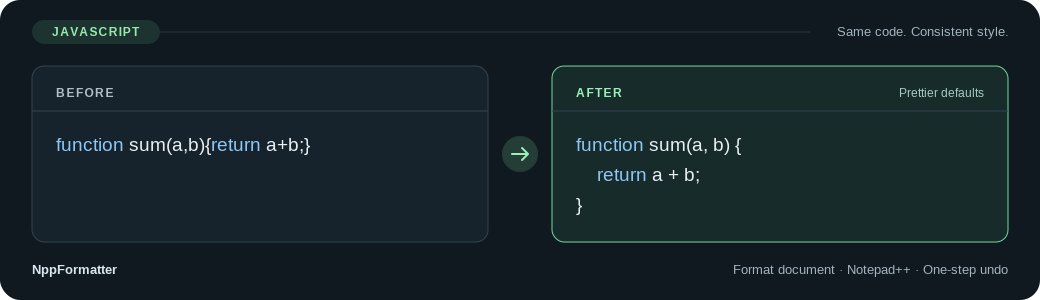
View the formatting example as text
Before:
function sum(a,b){return a+b;}After, using Prettier defaults:
function sum(a, b) {
  return a + b;
}
Project settings can change indentation, quotes, semicolons, and line endings.
For Python only, use the Ruff setup and skip the Node.js/Prettier steps.
Install Node.js 18 or later, then install Prettier 3.x. For use across projects:
npm install --global prettier@3Prefer a project-local installation? Run npm install --save-dev --save-exact prettier@3 in that project instead. The plugin always uses the package selected in Settings; opening another project does not automatically switch Prettier installations.
Use a manual-install ZIP from Releases when a tagged release is available. Until then, download a tested build from GitHub Actions:
- Sign in to GitHub and open a successful run for
main. - Under Artifacts, download and extract release-assets.
- Choose the ZIP matching Notepad++'s architecture, then extract that ZIP too.
| Your Notepad++ | Manual-install ZIP for 0.4.0 |
|---|---|
| x86 / 32-bit | NppFormatter-0.4.0-x86.zip |
| x64 / 64-bit | NppFormatter-0.4.0-x64.zip |
| ARM64 | NppFormatter-0.4.0-arm64.zip |
32-bit Notepad++ on 64-bit Windows still needs x86. Node.js runs as a separate process and only needs to be compatible with Windows; its architecture need not match the plugin. CI tests the plugin with Notepad++ 8.9.6 on all three architectures.
Close Notepad++, then copy the extracted NppFormatter folder into the editor's plugins folder. Back up an existing plugin folder before upgrading. Keep NppFormatter.dll and bridge.cjs together, along with the READMEs and license notices.
Use the manual ZIP above for this installation. Files ending in -plugin-admin.zip have a different layout for Plugins Admin. Generating those packages does not mean the plugin is already available in the official catalog.
- Restart Notepad++ and open Plugins → NppFormatter → Settings....
- Click Auto-detect for Node.js, then for Prettier. For a project-local installation, open a saved file from that project first.
- Click Save.
- Open a supported document and choose Plugins → NppFormatter → Format document.
Assign a shortcut under Settings → Shortcut Mapper → Plugin commands. Use Ctrl+Z to undo a formatting change.
Detection details and manual path lookup
Detection fills the fields; it does not install dependencies or save settings automatically. Failure preserves the previous value. Cancel discards unsaved changes, including while detection is running.
- Node.js: checks
PATH, common install locations, NVM/Volta locations, and the existing field; validates Node.js 18+ and resolves the real executable. - Prettier: uses the selected Node.js; searches the saved file's project and ancestors, the existing field, npm's global root, and common global locations. Untitled documents skip the project search. Detection checks package metadata without executing project configuration or Prettier package code.
If detection finds nothing, install the dependency or use Browse.... Restart Notepad++ after changing PATH.
# Actual Node.js executable
node -p "process.execPath"

# Global Prettier package directory
Join-Path (npm root -g) 'prettier'

# Project-local Prettier package directory; run inside that project
node -p "require('path').dirname(require.resolve('prettier/package.json'))"
Select the Prettier directory containing package.json, rather than its bin directory or prettier.cmd. The Browse dialog selects package.json and fills in its directory.
The language picker offers 16 built-in Prettier choices, 7 optional Prettier languages (Java, XML, PHP, SQL, Properties, TOML, Shell / Bash), Python (Ruff), and C / C++ (clang-format). Built-in formats need only Prettier; the seven optional Prettier languages need their respective packages, while Python needs Ruff and C/C++ needs clang-format. Actual syntax support depends on your installed formatter versions.
| Language / picker choice | Common saved-file extensions |
|---|---|
| JavaScript / JSX | .js, .mjs, .cjs, .jsx |
| TypeScript / TSX | .ts, .mts, .cts, .tsx |
| JSON | .json |
| JSON5 | .json5 |
| JSONC | .jsonc |
| HTML | .html, .htm |
| CSS | .css |
| SCSS | .scss |
| Less | .less |
| YAML | .yaml, .yml |
| Markdown | .md, .markdown |
| MDX | .mdx |
| Handlebars | .hbs, .handlebars |
| GraphQL | .graphql, .gql |
| Vue | .vue |
| Angular HTML | .component.html |
| Java — optional package | .java |
| XML — optional package | .xml, .svg, .xsd, .xsl, .xslt, .xaml, .resx |
| PHP — optional package | .php, .phtml |
| SQL — optional package | .sql |
| Properties — optional package | .properties |
| TOML — optional package | .toml |
| Shell / Bash — optional package | .sh, .bash |
Additional saved-file formats: Flow (.js.flow), MJML (.mjml), PostCSS (.pcss, .postcss), and JSON.stringify-style JSON (.importmap). Prettier infers these from the path; they have no dedicated picker entries. Project configuration can also select a built-in parser such as lwc. The extensions above are examples, not an exhaustive list.
Untitled documents: automatic Notepad++ language mapping covers JavaScript, TypeScript, Java, XML, PHP, SQL, Properties, TOML, Shell, Python, C/C++, JSON, JSON5, HTML, CSS, and YAML. Use Format with language... for other picker choices. MDX and Handlebars are distinct formats; selecting Markdown or HTML is not equivalent. Python uses Ruff; C/C++ uses clang-format.
For a global Prettier installation:
npm install --global prettier-plugin-java@2.11.0For a project-local installation, use npm install --save-dev --save-exact prettier-plugin-java@2.11.0 in the same project as Prettier. Then open a .java file or select Java when formatting. No Java-specific project configuration is required.
Saved Java files honor an explicitly configured Java parser plugin first. Otherwise, discovery checks the file's project and ancestors, the configuration location, and the selected Prettier installation. Untitled documents use the installation alongside the selected Prettier. Missing packages show an installation message and preserve the document; install and retry. A discovered package's load error is reported without silently switching to another copy.
For a global Prettier installation:
npm install --global @prettier/plugin-xml@3.4.2For a project-local installation, use npm install --save-dev --save-exact @prettier/plugin-xml@3.4.2 in the same project as Prettier. Open an XML file, including pom.xml or build.xml, or one of the XML-based formats listed above. For an untitled document, select XML in Notepad++ or in Format with language.... No separate executable or additional path setting is needed.
XML uses the same package discovery and missing-dependency behavior as Java. Explicit project plugins and parser choices take precedence. Other XML-based extensions can use the XML picker or a project parser override.
The default xmlWhitespaceSensitivity: "strict" preserves meaningful whitespace inside elements, so compact XML may remain on one line. For files where that whitespace is insignificant, add an override to your Prettier configuration:
{
  "overrides": [
    {
      "files": "*.xml",
      "options": { "xmlWhitespaceSensitivity": "ignore" }
    }
  ]
}
JSONC, MDX, and Handlebars use Prettier's built-in parsers and need no additional package.
Install only the packages you need alongside your global Prettier:
npm install --global @prettier/plugin-php@0.26.0
npm install --global prettier-plugin-sql@0.20.0
npm install --global prettier-plugin-properties@0.3.1
For a project-local installation, replace --global with --save-dev --save-exact and run the command in that project. These packages use the same discovery and missing-dependency guidance as Java and XML. No PHP executable or database connection is needed. Untitled files can follow the matching Notepad++ language or use the language picker.
- PHP: formats
.phpand.phtml. Pure PHP is the primary use case; the upstream plugin considers mixed PHP/HTML formatting unstable. - SQL: formats
.sql. Select the default SQL dialect in Settings; it starts with standard SQL and includes MySQL, MariaDB, PostgreSQL, SQLite, SQL Server, Oracle, BigQuery, and other dialects. Save to apply; Cancel discards the change. Saved files honor the project'slanguageoption first. A project selectingformatter: "node-sql-parser"uses its owndatabaseoption instead. The default engine does not support stored procedures or custom statement delimiters. - Properties: formats
.properties, including comments, duplicate keys, and escaped values. Output keeps Unicode by default. Project optionsescapeNonLatin1: trueandkeySeparatorcontrol Unicode escapes and key/value separators. The editor buffer must still be UTF-8.
To use PostgreSQL for a project's SQL files, add this Prettier override:
{
  "overrides": [
    { "files": "*.sql", "options": { "language": "postgresql" } }
  ]
}Install the packages you need alongside your global Prettier:
npm install --global prettier-plugin-toml@4.1.0
npm install --global prettier-plugin-sh@0.20.2
For project-local packages, replace --global with --save-dev --save-exact. Package discovery follows the same rules as Java and XML. Nothing is downloaded or installed by NppFormatter.
- TOML: requires Node.js 20+. Formats
.toml, includingpyproject.tomlandCargo.toml. npm installs the platform binding required by the package; no separate formatter executable is configured. - Shell / Bash: requires Prettier 3.6+. Formats
.shand.bash; other shell filenames can use Format with language.... Choose Bash, POSIX sh, mksh, or Bats in the Shell dialect setting. The default is Bash. Projectvariantvalues (1,2,4,8, respectively) override this setting. Scripts are formatted without being executed. This does not add PowerShell, Windows batch, Dockerfile, or ignore-file formatting.
To enforce POSIX syntax for a project's shell scripts:
{
  "overrides": [
    { "files": "*.sh", "options": { "variant": 2 } }
  ]
}Open Settings → Check formatting environment to inspect the currently entered paths before saving. The report shows Node.js and Prettier versions, the document used for project discovery, and each optional package's version, location, and status: Available, Not installed, or Check failed. Available packages have passed a small formatting sample, including loading native or WASM dependencies. This checks the installation; it does not validate every document or every project option.
The check runs in the background, can be cancelled by closing Settings, and neither installs packages nor saves settings. Changing either path clears the previous report. For project dependencies, activate a saved document in that project and rerun the check. External diagnostics retain their original language.
C/C++ uses a user-installed clang-format.exe, supplied by LLVM or an existing development toolchain. It runs independently of Node.js, Prettier and Ruff. In Settings, browse to the executable or use Auto-detect, then Save. Detection validates the current field, PATH, and standard LLVM installation directories with --version; it never installs a tool. Browse directly if your toolchain is installed elsewhere.
Supported files: .c, .cpp, .cc, .cxx, .h, .hpp, .hh, .hxx, including uppercase extensions. Untitled documents follow Notepad++'s C or C++ language; C / C++ (clang-format) is also available in the language picker. A saved extension takes precedence over highlighting, while an explicit language choice applies only to that operation.
Saved files use clang-format's .clang-format / _clang-format discovery from their directory. Project configuration takes priority over the C/C++ style setting. Without a project configuration, choose LLVM (default), Google, or Microsoft. Untitled buffers use that preset directly and do not inherit configuration from Notepad++'s working directory. Line endings follow clang-format's input detection and project rules.
The buffer is sent through stdin; the source file is never written or compiled. Native --cursor results retain the caret across Unicode text. Changes support one-step undo and stale-result protection. Tool errors and incomplete formatting preserve the original buffer; clang-format is a formatter, not a complete C/C++ syntax checker. Project settings can reorder includes or disable formatting.
Check formatting environment checks the executable version and formats a C++ sample using the selected fallback and current document directory. Disabled or unchanged samples are reported as unverified. Other formatting tools may be absent. CI uses the hash-verified LLVM-MinGW toolchain's clang-format 23.1.5; its x64 executable runs natively on x64 Windows and through Windows emulation on the ARM64 runner. This does not establish native ARM64 clang-format or 32-bit Windows coverage.
Python uses Ruff, an independent executable. It needs neither Node.js nor Prettier and does not use an npm plugin. Install Ruff yourself; for example, with an existing Python installation:
python -m pip install ruffOpen Settings, use Browse... or Auto-detect beside Ruff, and Save. Node.js and Prettier fields may be empty if you only format Python. Auto-detect checks the saved document's nearest ancestor .venv/Scripts/ruff.exe, the existing field, PATH, then the user's .local/bin directory. It validates candidates with ruff --version; it does not install anything. If pip's Scripts directory is absent from PATH, browse to ruff.exe directly. The selected path stays fixed until you change it or run detection again.
Supported routes: saved .py, .pyi, .pyw files, Notepad++'s Python language for untitled documents, and Python (Ruff) in the language picker. Jupyter notebooks are outside this release's scope. Ruff 0.17.5 is tested on Windows x64 and ARM64; x86 Notepad++ uses a separate x64 Ruff process on x64 Windows. Native 32-bit Windows is not covered by this Ruff integration.
Saved documents follow Ruff's configuration discovery (pyproject.toml, ruff.toml, .ruff.toml) from their directory, with --force-exclude. Excluded documents remain unchanged. Unsaved buffers use isolated Ruff defaults and the editor's LF/CRLF choice. Prettier settings do not affect Python.
Formatting sends the buffer through stdin and never writes the source file or executes Python code. It does not lint, fix code, or sort imports. Changes form one undo step; errors retain the original text. Ruff does not return cursor mappings: unchanged prefixes/suffixes retain their positions, while changed regions use a clamped line/column fallback, which may move the caret when code is rearranged.
Check formatting environment reports Ruff's path, version, and a real Python formatting probe independently of Node.js/Prettier. An excluded probe is reported as unverified rather than available.
| Command | What it does |
|---|---|
| Format document | Formats the entire current buffer, including unsaved changes |
| Format with language... | Overrides the language for this operation, keeping the file type, remembered choice, project options, and ignore rules |
| Settings... | Configures Node.js, Prettier, Ruff, clang-format, SQL/Shell dialects, C/C++ fallback style and timeout; checks installed formatting tools |
| About | Shows the version, supported formats, runtime requirements, and clickable project homepage |
Saved files use their path for parser inference and project configuration. Untitled files use a supported Notepad++ document language; plain text containing valid JSON is detected automatically. Otherwise, a picker appears and remembers your choice for that document during the current session.
Replacing all text, clearing and pasting again, saving or closing the document, or changing its Notepad++ language resets a remembered choice. Ordinary edits and formatting preserve it. When parsing fails, choose Show error details or Choose another language... to retry explicitly. Dependency, configuration, and timeout errors keep their own diagnostics.
Selection, recovery, and existing settings
- Formatting always applies to the whole document. A normal selection collapses to the mapped caret afterward; multiple carets and rectangular selections are outside the current scope.
- Editing, switching documents, saving, or moving the caret/selection during a request can discard its result. Retry once ready. Errors and timeouts leave the original text intact.
- A corrected language is remembered only when the untitled document was using a remembered choice. For a saved file or a supported Notepad++ language, recovery applies to that operation only.
- Untitled files have no project path for configuration lookup. The old global
UntitledParsersetting is ignored and removed on the next settings save; dependency paths and timeout are retained.
For Prettier languages, saved files use Prettier configuration, EditorConfig, and the nearest .prettierignore. For example, a .prettierrc can contain:
{
  "singleQuote": true,
  "semi": false,
  "tabWidth": 2
}
Ignored files are skipped. The document's LF or CRLF setting is used unless project configuration overrides it. JavaScript-based configuration and extra Prettier plugins may require a newer Node.js version or additional dependencies.
The interface follows Notepad++, with English, Simplified Chinese, and Traditional Chinese translations. Hong Kong Chinese uses Traditional Chinese; other locales fall back to English. Changing the editor language updates menus and an open Settings window without losing unsaved fields or requiring a restart. External tool diagnostics retain their original language; Windows supplies standard file-picker and message-box buttons.
| Item | Current behavior |
|---|---|
| Buffer | UTF-8, up to 8 MiB, one ordinary caret or selection |
| Timeout | 10,000 ms by default; accepts 1,000–120,000 ms and bounds one formatting request |
| Undo / no change | One undo step for changed output; no extra step for unchanged output |
| Bookmarks and folding | May move when the entire buffer is replaced |
| Accessibility and display scaling | Settings high-DPI and screen-reader behavior still needs broader release testing |
Settings live in NppFormatter.ini in the plugin configuration directory supplied by Notepad++. Saving existing settings backs up the previous version as NppFormatter.ini.bak. Close Settings and restore that backup to recover the previous configuration; the next formatting request reloads it. To upgrade or roll back, close Notepad++ and replace the plugin folder with the new or backed-up copy. To uninstall, remove the plugin folder; keep or remove the INI separately.
| Symptom | Next step |
|---|---|
| Plugin menu is missing | Match the DLL to Notepad++'s architecture, check the plugin folder, and restart |
| Formatting opens Settings | Configure Node.js and Prettier for Prettier languages; Python and C/C++ use their separate executable paths |
| Python requires Ruff | Install Ruff, then select or auto-detect its executable in Settings |
| Node.js or Prettier fails to load | Re-run Auto-detect; select the real node.exe and the Prettier package containing package.json |
| Pasted code uses the wrong language | Use Format with language...; whole-text replacement resets remembered choices |
| Parser or syntax error | Open the original diagnostic, correct the code, or explicitly choose another language |
| Java package is missing | Install prettier-plugin-java as described above, then retry |
| XML package is missing | Install @prettier/plugin-xml in the project or alongside the selected Prettier, then retry |
| PHP / SQL / Properties package is missing | Install the corresponding package above, then retry |
| SQL dialect error | Select the matching dialect in Settings or set the project’s language option |
| Compact XML stays on one line | XML preserves significant whitespace by default; see the XML configuration above |
| File is ignored / result discarded | Check .prettierignore; retry after editing, saving, or switching documents |
| Request times out | Inspect project configuration and plugins; adjust the request timeout if needed |
| UTF-8 is required | Choose Encoding → Convert to UTF-8 and retry |
| Buffer or selection is rejected | Stay within 8 MiB and use one ordinary caret or selection |
Still stuck? Open an issue with the plugin, editor, Node.js, Prettier, Ruff, and clang-format versions; a minimal sample; relevant configuration; and the complete error or status message.
On Windows, install Git, Node.js/npm, Python 3.12+, and PowerShell, then run:
git clone https://github.com/oiltea94/npp-formatter.git
cd npp-formatter
npm ci
python scripts/bootstrap.py
python tests/download_ruff.py --arch x64
$env:RUFF_EXE = (Resolve-Path build/x64/ruff/ruff.exe).Path
$env:CLANG_FORMAT_EXE = (Resolve-Path .tools/llvm-mingw-20261104-ucrt-x86_64/bin/clang-format.exe).Path
powershell -NoProfile -ExecutionPolicy Bypass -File scripts/build.ps1 -Architecture all
The bootstrap downloads SHA-256-pinned LLVM-MinGW 20261104 / UCRT. The compiler runs on Windows x64 or through x64 emulation on Windows 11 ARM64 and cross-compiles all three targets. Supply an existing toolchain through -Toolchain or LLVM_MINGW_ROOT. Build output goes to dist/; development dependencies and build tools stay outside the install ZIPs.
Build options, tests, and source layout
-Architecture accepts x86, x64 (default), arm64, or all. -SkipTests skips bridge/native tests but still verifies package contents. -RequireRuntimeTests requires a host that can execute the target. A normal cross-build on x64 skips ARM64 runtime tests explicitly; it is not a runtime pass.
| Command | Purpose |
|---|---|
npm test |
Real Prettier and optional language package integration tests |
python -m unittest discover -s tests -p test_artifacts.py |
Check built DLLs and ZIP rejection cases |
python -m unittest discover -s tests -p test_catalog.py |
Check catalog updates and PR reuse without API writes |
python tests/download_npp.py --arch x64 |
Download the hash-verified portable test editor |
python tests/editor_smoke.py --arch x64 |
Exercise a matching editor; use NPP_EXE to select its executable |
Editor tests cover English, Simplified Chinese, and Traditional Chinese, including live language changes. They use an isolated editor copy, verify its architecture, and leave the active installation alone. Use --language en, zh-CN, or zh-TW for a single locale, and 64-bit Python for x64/ARM64 editors. CI runs matching native process and editor tests on windows-latest and windows-11-arm.
The native plugin and process management live in src/, the Prettier adapter in bridge/, and tests in tests/. The prototype starts a Node.js process for Prettier, a Ruff process for Python, or clang-format process for C/C++ per request and allows one active request at a time. The product specification records the current scope and intended architecture.
Release and Plugins Admin automation
The workflow follows the build → assembly → release → catalog structure used by npp-yaml-properties.
| Trigger | Result |
|---|---|
main push, pull request, or manual build |
Tests all architectures and uploads release-assets plus bilingual release-notes; does not publish a Release |
Push vMAJOR.MINOR.PATCH |
Requires matching package/lockfile versions and a CHANGELOG.md entry; publishes only after all checks pass |
| Release publication | Verifies public assets and prepares a catalog proposal; submission is opt-in |
| Manual catalog workflow | Previews or submits a published tag without rebuilding |
package.json supplies the DLL and About versions. Add bilingual release notes before tagging. Verified attachments are uploaded to a draft before publication; existing releases are not overwritten. Each release contains three manual ZIPs, three Plugins Admin ZIPs, manifest.json, SHA256SUMS, and three catalog entry JSON files. Manual ZIPs contain the plugin folder; Plugins Admin ZIPs put the DLL and bridge at the archive root.
The catalog workflow defaults to dry_run: true and saves official-catalog-proposal. To submit, configure the NPP_PLUGIN_LIST_TOKEN Actions secret with push access to oiltea94/nppPluginList and permission to open PRs in notepad-plus-plus/nppPluginList, then select dry_run: false. Set the repository variable NPP_CATALOG_AUTO_SUBMIT=true to enable automatic submission after future tag releases.
Existing NppFormatter PRs are reused and reviewer notes preserved. Downgrades and a changed archive hash for the same version are rejected. Catalog failures can be retried independently. Metadata uses tested Notepad++ 8.9.6 as the minimum; official review and catalog distribution are still required. Actual Plugins Admin install/update/remove behavior remains to be validated.
These are planned capabilities, not current menu commands:
| Next area | Intended result |
|---|---|
| Generic tool definitions | Register command-line tools through configuration |
| Tool selection | Per-language defaults, project overrides, and dependency diagnostics |
| Editing workflows | Selection formatting and format on save |
| Text transformations | Minifiers, converters, and ordered tool pipelines with one final undoable edit |
Process reuse, additional encodings, and improved bookmark/folding preservation are later work. Contributions are welcome: start with a focused issue, keep changes scoped, run the relevant checks, and update both README translations when behavior changes.
- Formatter for Sublime Text — inspiration for the broader tool-based workflow. NppFormatter is an independent project.
- Notepad++ and Prettier — the editor and first formatter integration.
- prettier-plugin-java — optional Java formatting.
- @prettier/plugin-xml — optional XML formatting.
- Awesome README — inspiration for this documentation's organization and presentation.
Third-party source versions and license notices are recorded in third_party/README.md. Install packages include the applicable notices in licenses/.