


Writing commit messages was killing me. So I built Commity.
A tiny CLI tool that looks at your staged git changes, asks OpenAI what the hell you just did, and gives you a clean, emoji’d commit line you can actually be proud of.
No more Update or fixes lol.
- Reads your
git diff - Sends it to OpenAI
- Spits back a commit message that makes sense
- Drops in a matching emoji (because vibes matter)
- You hit enter. Boom. Committed.
- 🧠 Smarter than you on bad days – AI writes your commit messages
- 🎯 Emoji sniper – Tags it right: 🐛 for bugs, ✨ for features, etc.
- 🔒 Safe – Your API key stays in
.env, not flying around - 💬 Talks to you – Edit, confirm, cancel. Like a chill assistant.
- 🎨 Sexy CLI – Colors, prompts, feedback. Feels alive.
1. Install
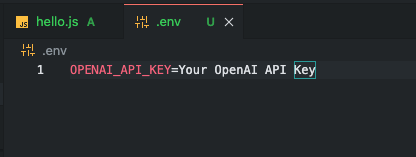
npm install -g commity-ai-commit-tool2. Add your OpenAI key
echo "OPENAI_API_KEY=sk-..." > .env→ Grab key from here
→ Yes, free tier works too
3. Use it
git add .
commity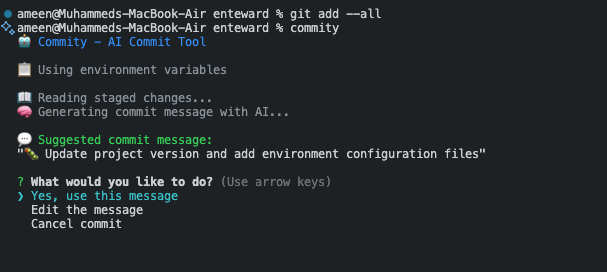
🤖 Commity - AI Commit Tool
📖 Reading staged changes...
🧠 Generating commit message with AI...

💬 Suggested commit message:
"🐛 Fix authentication validation and error handling"

? What would you like to do?
❯ Yes, use this message
  Edit the message
  Cancel commit

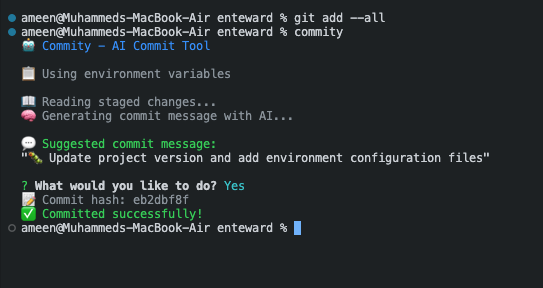
✅ Committed successfully!
You just saved 2 minutes and looked smart doing it.
| Type | Emoji |
|---|---|
| New Feature | ✨ |
| Bug Fix | 🐛 |
| Docs | 📚 |
| Performance | ⚡ |
| Refactor | ♻️ |
| Tests | 🧪 |
| Config | ⚙️ |
| Security | 🔒 |
| UI | 🎨 |
| DB | 🗄️ |
| API | 🔌 |
| Deploy | 🚀 |
| Packages | 📦 |
| Env Variable | What it does | Default |
|---|---|---|
OPENAI_API_KEY |
Your OpenAI key (duh) | – |
OPENAI_MODEL |
Which model to use | gpt-4o-mini |
Supported Models:
gpt-4o-mini(default)gpt-4ogpt-4-turbogpt-3.5-turbo
- API key not found? → You forgot the
.envfile - "No staged changes"? → Run
git add . - Not in a repo? →
git init, friend
commity/
├── cli-wrapper.js   // handles terminal
├── ai.js            // OpenAI stuff
├── git.js           // git logic
├── prompt.js        // CLI questions
├── package.json     // npm life
└── README.md        // this file
Yes please. PRs welcome.
- Fork it
git checkout -b cool-feature- Code
git commit -m '✨ adds cool stuff'- Open PR
Bugs? Feature ideas? → Open an issue
MIT. Steal with style.
- Powered by OpenAI (shoutout)
- Inspired by late-night coding guilt
- Built by Muhammad Ameen with coffee, rage, and love
No more cringe commit messages. Let Commity talk.
Install now → npm install -g commity-ai-commit-tool