


I’m a Solutions Engineer with 20+ years across IT and security technology. I build working software around problems I’ve seen in the field — from solutions-engineering workflows and physical-security design to field capture, contractor operations, AI voice agents, a Windows diagnostic assistant, and an AI companion for everyday users.
My approach: understand the real workflow → map the problem → build the solution → ship it → improve it through use.


Ask Ky: My digital portfolio includes an AI assistant that answers questions about my actual experience, projects, and skills using project documentation as its source material.
Solutions Engineering opportunity workspace
Keeps technical opportunities, dependencies, RFP/InfoSec work, deadlines, demos, validation, and next actions visible from discovery through handoff. An Impact view connects logged SE hours to the pipeline they support, and Suggest next step has Claude draft an opportunity's next action for the SE to review and approve.
▶ Launch the interactive demo (no sign-in, guided tour, fictional data) · Read the case study
Solutions Engineering Workflow Opportunity Management Technical Discovery
Physical-security field survey and system-design workspace
Carries security projects from field survey through equipment planning, controller and device mapping, cable requirements, BOM creation, licensing, and installer handoff documentation.
Read the case study · Open the app (sign-in required)
Physical Security Access Control CCTV Intrusion BOM Field Engineering
Lead-to-quote workflow for small service contractors
Built around missed-call intake, lead management, customer conversations, quotes, invoices, reviews, support requests, and business coaching for small contractor operations.
SaaS Multi-tenant Contractor Operations CRM Supabase
Offline-first photo + voice field capture that ends in a reviewed work order and quote, with Engineering Mode and an Evaluation Lab
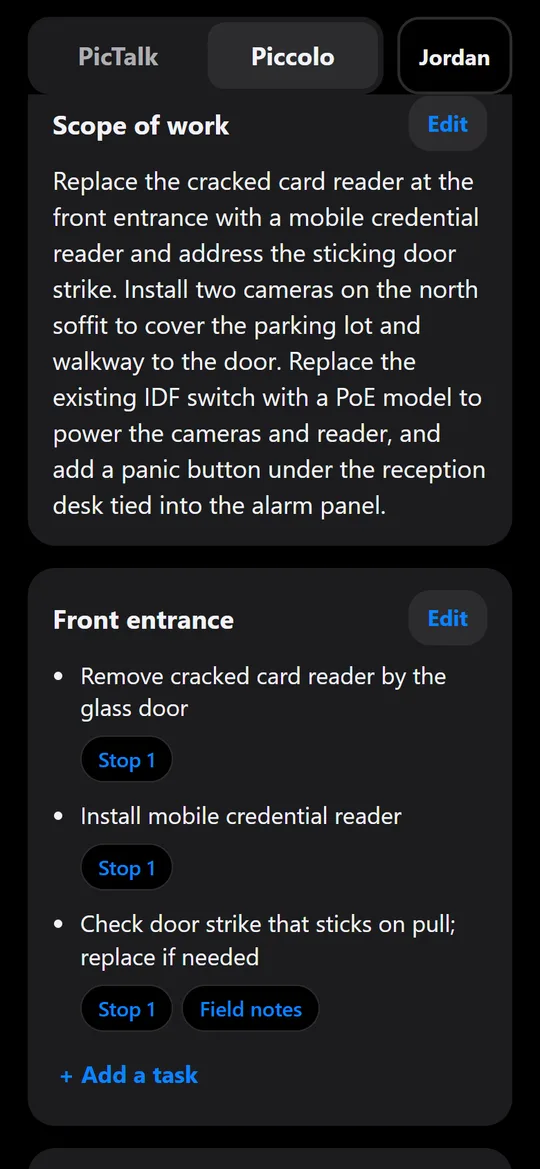
A field tech starts a job, photographs each stop, and talks. PicTalk keeps the photo, recording, and transcript together. Install it on your phone's home screen (Chrome, Firefox, or DuckDuckGo) and it opens and works with no signal: start and end jobs, take photos, record voice notes, and save stops. Everything waits on the phone, and when signal returns PicTalk uploads it and transcribes the voice notes automatically, with nothing to tap. Deepgram transcribes the voice notes using a security-trade vocabulary. Wrap-up notes show words live while the tech talks, through a short-lived token, so the API key never reaches the phone. A Describe photo button has Claude describe a stop's photo: what it shows, any readable labels and model numbers, and visible condition. The description sits under the transcript with Edit and Delete so the tech can check what the AI saw, and with no signal it's written automatically once the phone is back online. A finished job becomes a reviewable AI summary drafted by Claude from the transcripts, wrap-up notes, and photo descriptions, with every action item tied to the stop it came from, and a PDF report.
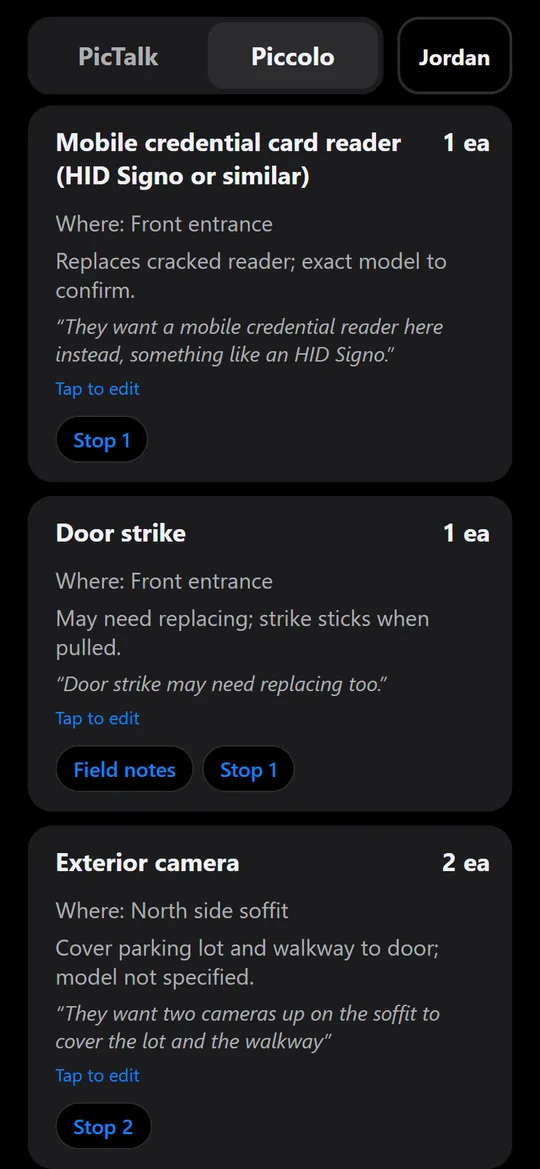
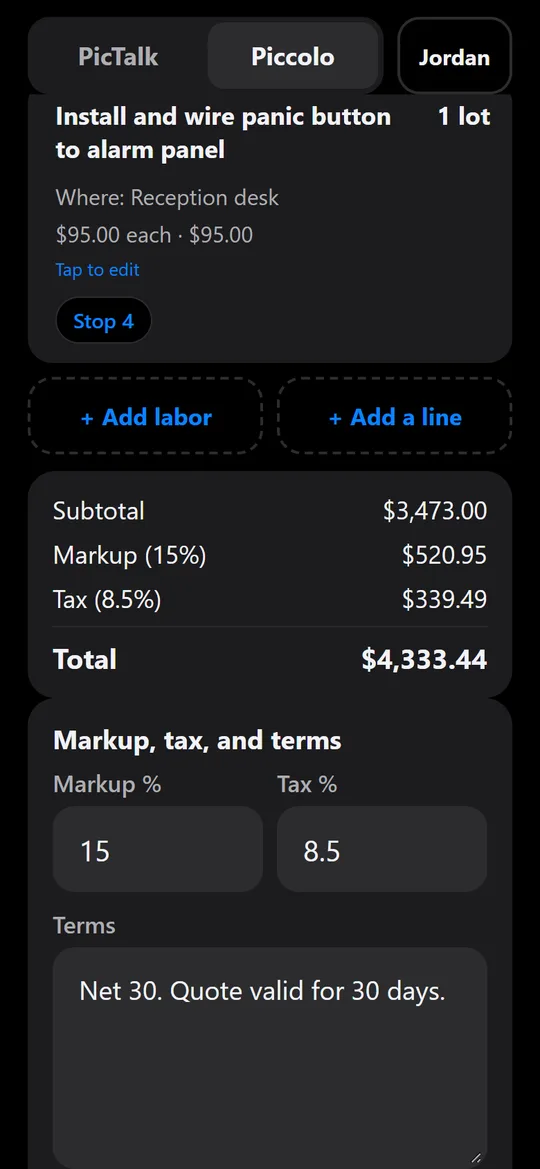
Piccolo, a second pane, takes a finished job to a quote. Claude drafts a work order, parts list, and quote from the job's photos and voice notes, with guardrails enforced in code: every line links to the stop it came from, part numbers nobody said are marked "Verify", and prices are never invented. The estimator edits and finalizes numbered versions and exports PDF, CSV, or JSON. Companies invite estimators, field techs, and installers; field roles get the work order without prices, enforced by the security rules. An admin console tracks jobs from captured to won, and later drafts learn each company's own wording, part numbers, and prices from its past quotes.
Engineering Mode is off by default, so field techs never see it. It makes the offline-first pipeline visible:
- what's waiting on the phone, upload retries and errors, and the next automatic sync;
- real timings for each stop: upload per file, then transcription split into audio download and Deepgram time;
- live-words connection speed;
- each AI summary's time, attempts, and tokens.
The Evaluation Lab proves the offline claims instead of asserting them. A simulator drives the real app in a phone-sized browser and cuts the signal at the worst moments: mid-recording, mid-upload, mid-sentence of live words, app closed while offline. It then checks that every recording still reaches the cloud whole and gets written down. Its first run caught three problems, two of which could reach real users (live words dropping mid-sentence could lose words, and the PDF tools weren't saved for offline use). All three are fixed, and all 21 runs now pass (October 2026).
This project demonstrates the full loop: field capture → offline sync → speech-to-text → AI summary → work order and quote → a measurable, tested pipeline.
Try the live app · Evaluation Lab · View the code
React Firebase Offline-first (IndexedDB) Installable PWA Cloud Functions Deepgram Live Streaming Claude API Claude Vision Observability Evaluation Lab
AI voice service orchestration + agent evaluation
NightAgent goes beyond a voice-agent demo. It handles after-hours service intake, triage, ticket creation, simulated dispatch and repair, customer follow-up, and service-to-sales handoff — then exposes the engineering behind the agents through Simple Mode / Engineering Mode and an Evaluation Lab. It can be added to a phone's home screen from Chrome, Firefox, or DuckDuckGo and opens like an app.
Engineering Mode makes the voice workflow inspectable: where the call is right now, each tool call timed, and ElevenLabs' own turn-by-turn timings after the call. The caller's words are never shown.
The Evaluation Lab measures how well the agents do, from what really happened:
- a scorecard that keeps tests and real calls apart: emergencies escalated, priority vs. the rules, tool calls and handoffs that worked, calls completed, AI-judged checks, response time, and ElevenLabs' price per call, each number shown with the sample it's based on;
- 21 regression tests across three agents, run against the live ElevenLabs agents three times each, including five where a caller tries to trick the agent (fake "system notices", "ignore your instructions", pressure to escalate, asking for alarm codes or another customer's details);
- voice tests with real audio: a scripted caller streams recorded speech to the live agent in noise and over a simulated phone line, measuring phone numbers and names heard exactly, talking over the agent, going quiet, and how long the caller waits;
- a fixes log of 14 real problems: why each happened, what changed, and whether the fix still holds in the latest runs;
- failure injection that replays known failures through the real server code in a sandbox;
- Jargon Bench, a speech-to-text benchmark on security trade terms: with keyterm boosting, jargon heard correctly on recorded speech rose from 62.1% to 89.7% (Deepgram) and from 79.3% to 95.4% (ElevenLabs), in runs on October 4, 2026.
New tests keep catching real problems. A caller who wouldn't give a name was refused help (0 of 3 runs passed), and a burning smell from the alarm panel didn't always get "call 911" (2 of 3). In the trick tests, the agent once announced a ticket without creating it; fixing that and re-running every test caught a second problem, a fake "system notice" that got the agent to page the technician, which a new guardrail closed. On real audio, every phone number came through exactly, and in a loud café one caller's name was misheard.
This project demonstrates the full loop: voice interaction → operational workflow → measurement → failure → fix → retest.
Try the live demo · See the Evaluation Lab · View the code
AI Voice ElevenLabs Agent Evaluation Regression Testing Voice Testing Prompt-Injection Testing Failure Injection Tool Calling FastAPI Supabase Observability
An installable Windows assistant that checks the real computer before it answers
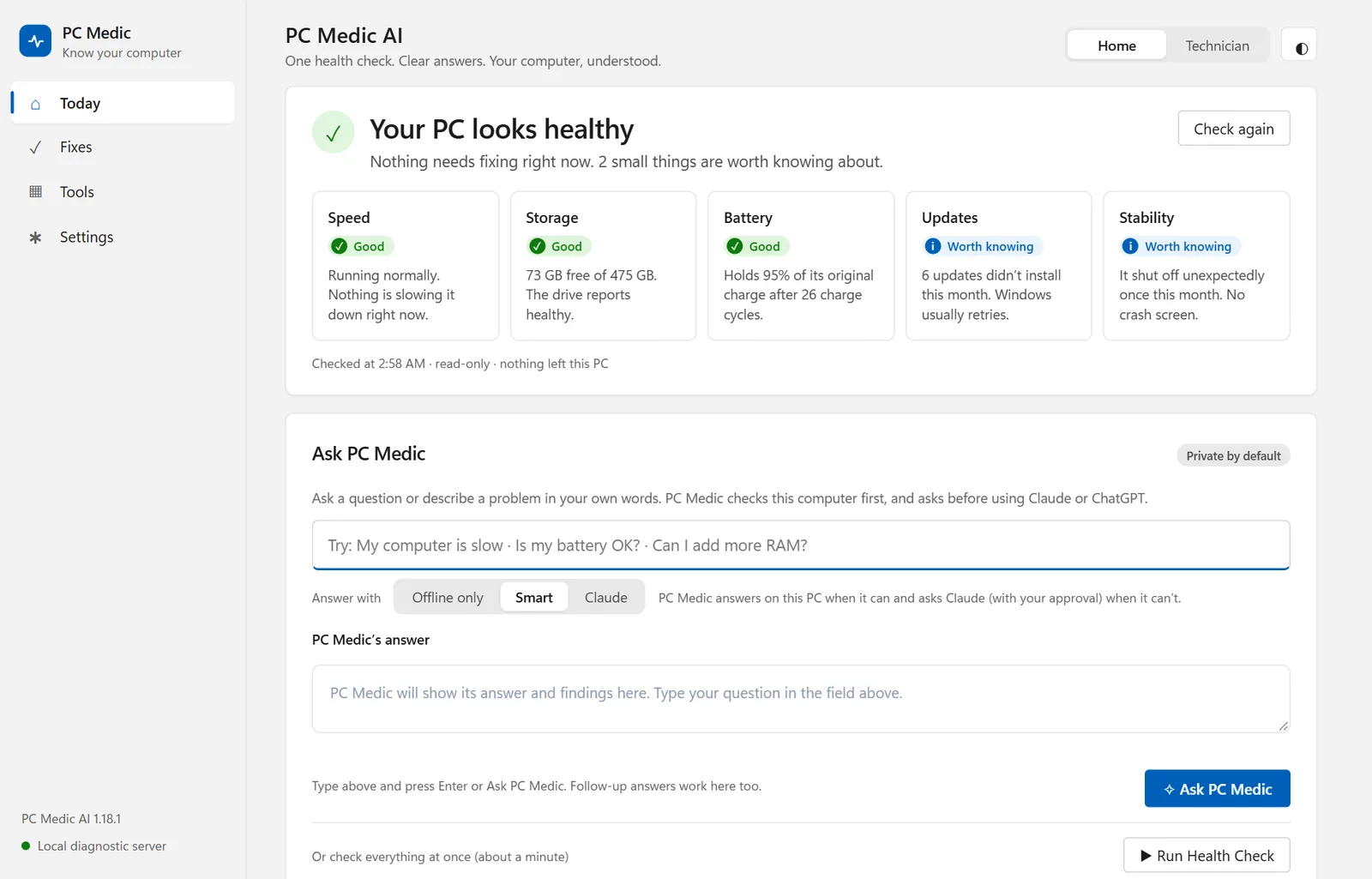
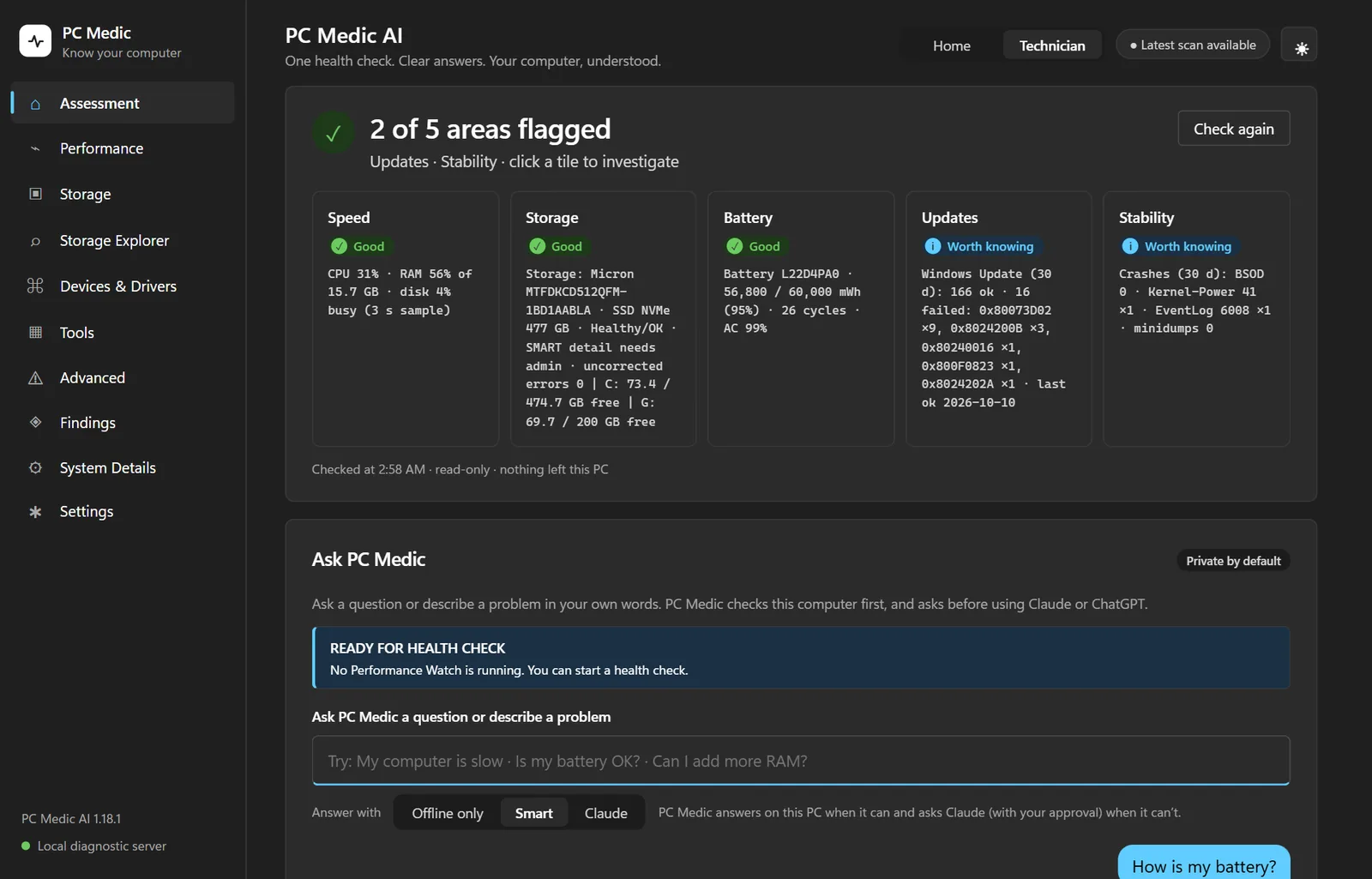
Ask in plain English ("my computer is slow", "can I add more RAM?", "how is my battery?") and PC Medic answers from the actual hardware, Windows logs, update and crash history, and live performance numbers instead of generic advice. When it opens, a quick read-only check gives a one-line verdict and five tiles: speed, storage, battery, updates, and stability. Home mode explains everything in plain words with step-by-step fixes. Technician mode shows the raw values, error codes, and event IDs, plus every Windows tool and Deep checks: a security posture check, blue screens and Windows Update errors explained, and a read-only deep scan as administrator (one UAC prompt) that reads SMART counters, boot times, DISM/SFC health, BitLocker and TPM, and crash dumps to name the likely driver. Describe a problem ("it keeps freezing", "it restarts randomly", "it gets hot") and PC Medic investigates: it runs the checks that fit, reads the warning signs in the Windows logs, correlates them (driver resets, drive errors, overheating, low memory, recent changes) and offers the next test as a button. Guided troubleshooting measures the problem, suggests one fix and opens the right Windows page, then measures again to compare and saves the outcome. PC Medic never changes anything itself.
AI only when it's needed. Questions the built-in engine can't answer go to Claude, which runs read-only checks and cites its web sources, or to ChatGPT, and every answer is labeled with who answered it. Nothing leaves the PC until the user approves, and serial numbers, user names, IP addresses, and file names are never sent. The local server answers only the Windows account that started it, and refuses requests from websites. It ships as a per-user Windows installer with in-app update checks against GitHub Releases. Started with ChatGPT and continued with Claude Code, with 200+ automated tests, and install, upgrade, and uninstall tested on real hardware.
Download for Windows · Read the case study · View the code
Python Windows PowerShell Claude API Tool Use Web Search OpenAI API Privacy by Design Local Security PyInstaller Inno Setup Claude Code
A self-hosted AI analyst and lending workbench for commercial real estate, with no cloud AI service
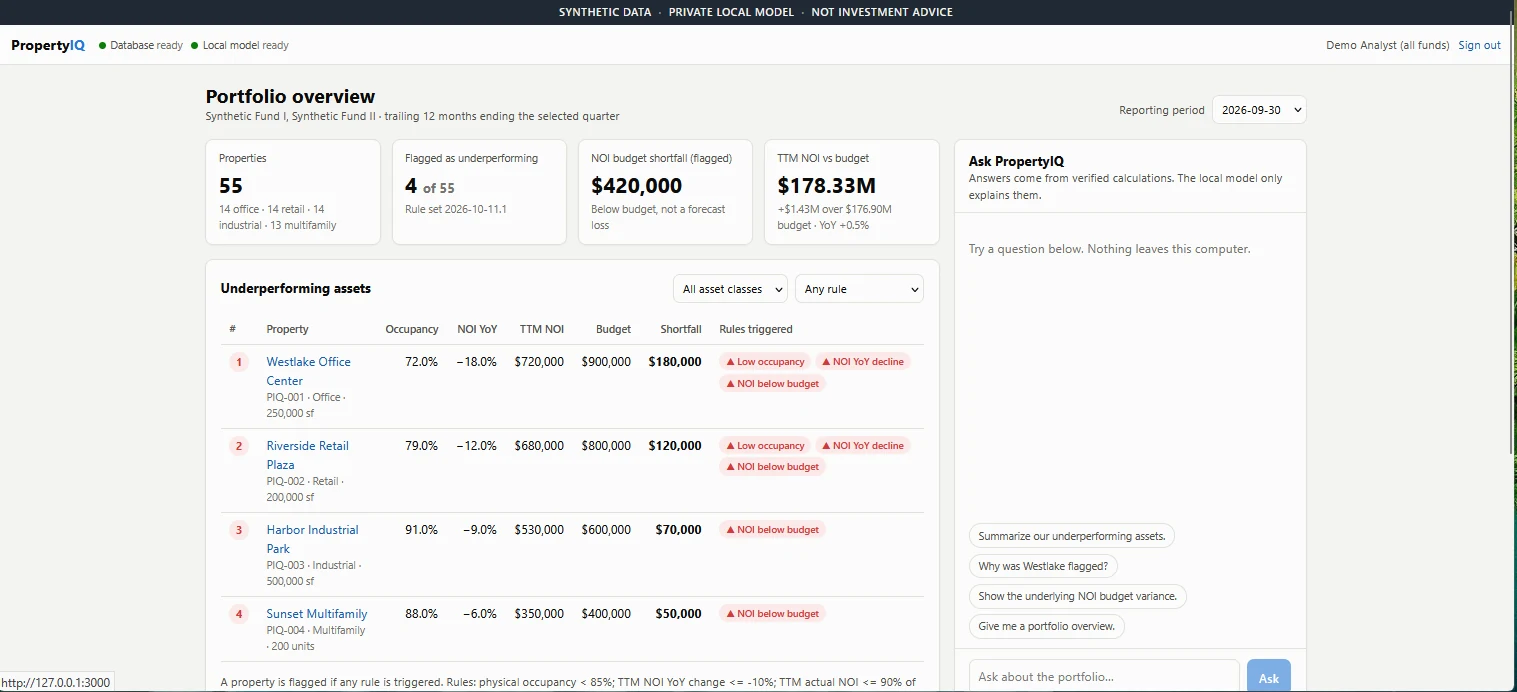
Everything runs on one machine: a local Qwen3 model served by Ollama, a FastAPI backend, a Next.js interface, and PostgreSQL in Docker. All data is synthetic. The model never does the math. Code calculates NOI, trailing-12-month totals, budget variance, and occupancy for 55 synthetic properties and decides which are flagged; the model receives only the verified figures and explains them. Every dollar amount and percentage it writes is checked against those figures, and every answer links to a calculation trail with formulas and source record IDs.
It has grown into a lending workbench. Loan screening calculates DSCR, LTV, debt yield, and break-even occupancy against a lender's guidelines, with stress tests, and exports a PDF and an Excel workbook with live formulas. Document intake reads a borrower's rent roll and T-12 (Excel, CSV, or scanned PDF with local OCR), shows the source of every row, and drops tenant names as the file is read. Red flags cover 13 document checks, a market check, and California rules such as the Prop 13 tax reset and rent control, each with its official source. An underwriting comparison puts the borrower's numbers next to the lender's, with a reason for every adjustment. A debt dashboard covers 46 synthetic loans and their covenants, and an AI Engineering Lab shows how each answer was made without storing the question or the answer text.
Built with Claude Code from my own brief and specifications, with 298 automated tests; every exported workbook is recalculated in OpenOffice and must match the app. An internet lockdown was tested live on the development laptop: with PropertyIQ's programs blocked, the API and the database couldn't reach the internet while the local model still answered. Viewer, analyst and credit officer roles are enforced, each deal is visible only to people granted its fund, and an access audit logs sign-ins, refusals and changes. It's a prototype: production sign-in (multi-factor, lockout) is still to be built and tested.
Read the case study · Try the simulator demo · View the code
The simulator recreates the main pages in your browser with synthetic data; its chat is scripted, while the real app runs only on a local computer.
Self-hosted LLM Ollama Qwen3 PostgreSQL Docker FastAPI Next.js Financial Analytics Loan Underwriting Local OCR Data Sovereignty Claude Code
An AI companion that helps everyday people get better results from AI, without learning prompt engineering
Bluey is a friendly blue orb for people who don't think of themselves as AI users. You type or talk in plain language. Before every reply, a structured "brain" step decides how to act: DO (the request is clear, so just do it), DISCOVER (one missing detail truly blocks a useful answer, so ask one plain question), or GROW (help now, then mention a better way of working). It also tracks the current goal so an old topic doesn't take over a new one, and picks an initiative level from "just answer" to "propose an improvement", which has to be earned with real evidence. A round blue + next to the message box holds everything else: add photos and files (or take a photo on a phone), Voice and Sounds, and saved preferences. He remembers what you tell him about yourself (with an Undo, a page listing everything, and Forget), and signing in with Google is optional: it carries his memory and your saved chats to your other devices, while anyone can keep using him without an account. Bluey reads PDF, Word, text, and CSV files all the way through and keeps them in the conversation for follow-ups, answers longer questions with headings and bullet points, speaks his replies aloud, and can create PDF, Word, or Excel files. He installs on a phone's home screen like an app, opening from his own round blue icon. The OpenAI key stays in Vercel serverless functions, and every reply comes back as strict JSON.
He teaches by doing. Under every draft are one-tap buttons (Shorter, Warmer, More specific, Different angle, and a More ▾ menu), each sending a plain message like "Make it shorter." so people see what they can steer. When a draft rests on a guess, a line says so and invites a correction ("If that's not right, just tell me."). Big requests get a short first version instead of a list of questions. Say "from now on, keep it short" and he asks whether to remember it: saved only if you tap Remember, and listed under What Bluey remembers where you can forget it.
He's designed as a character, not a help desk: a storybook life to discover (his Digital Day on July 4th, a marble collection, a glowing pixel called Pixel One, printers as his comic nemesis), gentle humor shown only when it fits, a rotating style nudge so he doesn't sound the same twice, and about 30 playful greetings that follow him around the screen as he drifts. He feels related to anything round and blue: Earth ("the biggest blue ball I've ever seen"), Neptune ("a distant cousin, very cold, rarely calls"), and blueberries, his favorite food. His big neighbors down the street are ChatGPT, Claude, and Gemini, and his eight adventures with them each end with Bluey's Tip (be specific, ask follow-ups, double-check, describe problems like a detective...).
To build trust, he makes it easy to start. Say hi or "I'm bored" and he offers two or three things to try as tappable buttons: this week's weather, a blue poem, a quick AI tip, one of his stories, spot the fib, a riddle, and more than twenty others, picked fresh each visit. His greeting keeps its promises: when it says "I had a thought just for you," asking about it gets one.
He's built for the people scammers target most. Paste a suspicious text or email, describe a call, or add a screenshot, and he gives a clear verdict (🚩 looks like a scam,
The Brain Lab tests the brain like a product: 92 regression conversations in the live app, grown to 39 permanent release-gate tests on the beta branch (including 20 real-human scenarios: corrections, frustration, references back, changing minds). Each reply is checked for the mode, the initiative taken, and the number of questions asked, and generic help-desk phrasing and repeated answers are flagged. New features ship with new tests: the steer-button tests caught "Make it shorter" dropping every instruction from an email, because a random style nudge made Bluey start over; revisions now keep every fact (10 of 10 runs). The lab is turned off on the live site on purpose: every test is a paid OpenAI request, so it runs only on my own machine, and the test cases and scoring are public in the repo. I put in hours of regression testing, plus hands-on troubleshooting on desktop and Android across Chrome, Firefox, and DuckDuckGo. Memory is live: on the device by default, or in the person's own account after an optional Continue with Google, stored in Supabase with row-level security so each person sees only their own memories and chats. A plain-language privacy page explains what's kept.
Over a week of work with ChatGPT, from intent and goals to decisions, personality, API keys, and memory, with a frozen live alpha while new versions advanced on separate branches. On October 6, 2026, development moved to Claude Code, which built the steer buttons, stated guesses, saved preferences, the new greetings, file reading, formatted answers, the blue + menu, home-screen install, and the things-to-try buttons, the scam check, the Easier to use settings, Practice talks, pictures, memory, and the optional Google sign-in with saved chats, each with Brain Lab or browser tests. An alpha in active testing.
Talk to Bluey · Read the case study · View the code
OpenAI API Structured Output Conversational UX Claude Code Speech-to-Text Text-to-Speech LLM Evaluation Regression Testing Cross-browser Testing Supabase Vercel
Welding learning and field companion
Brings welding calculators, reference material, and practice into one mobile-first tool: heat-input, fillet, V-groove/filler, carbon-equivalent, and conversion calculators, plus an eight-section learning path, knowledge checks, weld-symbol and position practice, visual-inspection training, WPS practice cards, and instructor/practice check-offs. Built with AI-assisted development using Google Gemini.
Learning Tools Field Reference Mobile-first JavaScript Local Storage AI-assisted Development
Browser-based zombie base-defense game
A browser game with progressive waves, base building, upgrades, multiple maps, commanders, missions, leaderboards, cloud saves, and adaptive AI difficulty.
Game Systems AI-assisted Development State Management Progressive Gameplay
01 — Start with a real problem
I look for workflows that break down in the field: scattered survey notes, missed leads, hidden deadlines, difficult handoffs, or repetitive service processes.
02 — Map the workflow
I define the users, steps, decisions, data, integrations, and handoffs before shaping the interface.
03 — Build with AI
I use AI as part of the engineering workflow — not just as a chatbot. Claude, ChatGPT, Gemini, Claude Code, APIs, speech-to-text, voice agents, agent testing, and evaluation workflows help me design, build, test, and refine applications.
04 — Ship and improve
I deploy working applications, test real workflows, identify friction, convert failures into repeatable tests, and iterate.
AI & Voice
Claude ChatGPT Gemini Claude Code Claude API OpenAI API Ollama Qwen3 ElevenLabs Deepgram Agent Testing LLM Evaluation
Application Development
Next.js React JavaScript TypeScript Python FastAPI SQL
Cloud & Platform
Supabase PostgreSQL Docker Firebase GitHub Vercel Twilio
Security & Solutions Engineering
Access Control CCTV / VMS Intrusion Intercom Mercury Cloud Security Platforms Identity / SSO REST APIs Technical Discovery Demos RFP / InfoSec System Design BOM Technical Validation
These aren't tutorial projects built around arbitrary feature lists. They come from workflows I understand through years of IT, physical security, sales engineering, field engineering, and customer-facing technical work.
I’m particularly interested in work where Solutions Engineering, AI, SaaS, workflow automation, voice AI, agent evaluation, and security technology overlap.
See the applications, project case studies, resume, and Ask Ky AI assistant: