

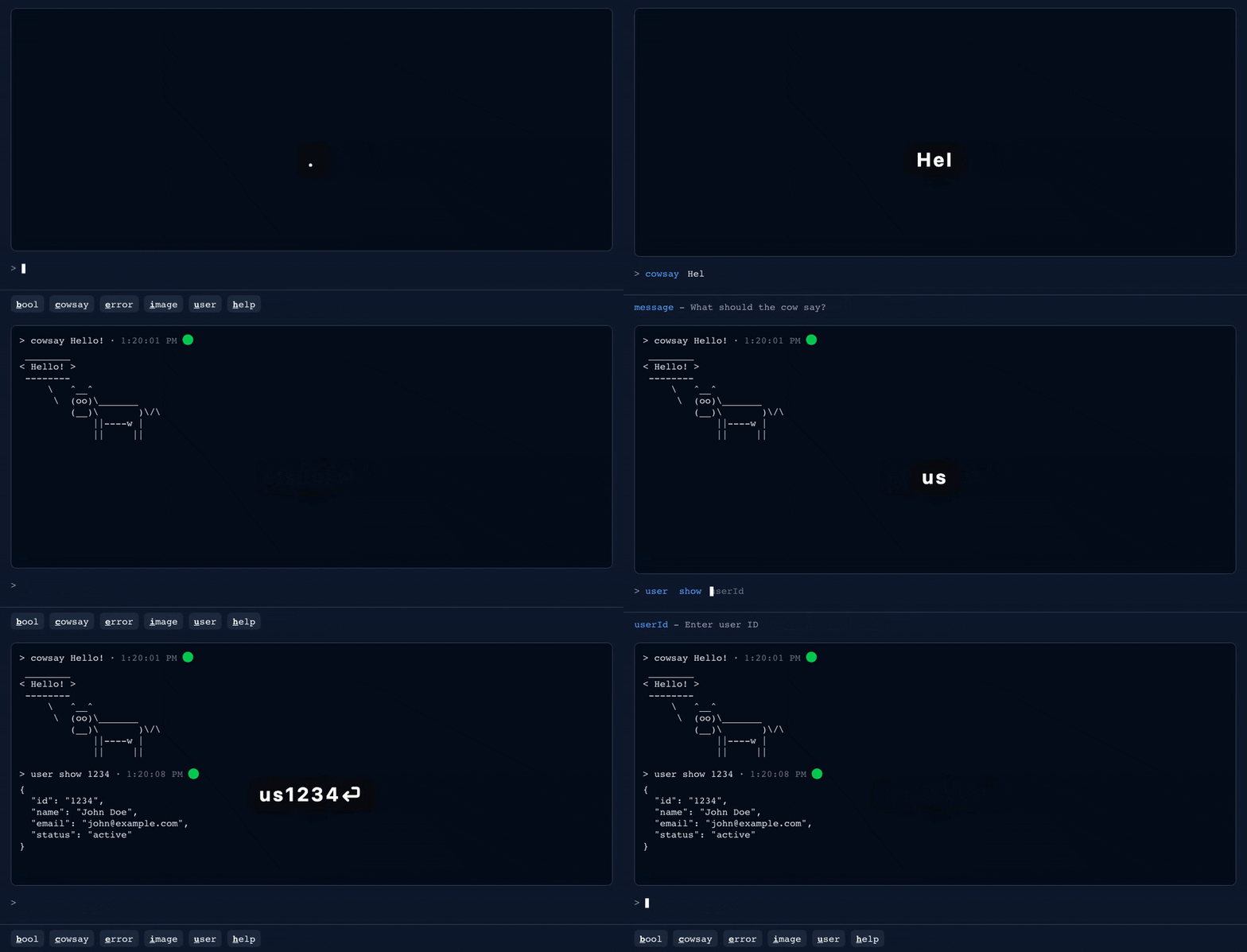
A terminal-style command console embedded in your React app. Citadel turns repetitive, parameterized operations — "look up account 1234", "refund order 5678" — into a few keystrokes, with results rendered inline. Built for internal back-office tools, admin panels, support dashboards, and dev debug overlays.
The core interaction is prefix expansion: users type the shortest unambiguous
prefix and Citadel expands it. us becomes user show.
- Fewer buttons and forms: expose internal actions as commands
- Debug in context: call APIs, inspect JSON, mutate app state without leaving the page
- Clean UI: hidden-by-default overlay (toggle key configurable, default
.) - Typed DSL: argument help, async handlers, structured results (
text,json,image,error,bool) - Lightweight: ~16 kB gzipped including styles, zero runtime dependencies — React is the only peer
- Back-office & support tooling: lookup → modify → annotate loops drop to a few keystrokes each. Handlers run in the browser with the user's session, so keep server-side authorization as the gate on every mutation.
- Dev debug overlay: a quake-style console — seed data, toggle flags, impersonate users. Shadow DOM-isolated, easy to strip from production.
- Keyboard-first vertical SaaS: trading, logistics, dispatch. The Bloomberg terminal's command line is this pattern.
- Embedded dashboard consoles:
displayMode: 'inline'puts a query console inside a metrics or status page.
The common thread: known vocabulary, high frequency, parameterized operations, data coming back. For casual visitors or form-shaped input, a search palette or form is the better tool.
A ⌘K palette (kbar, cmdk) is fuzzy search over actions — ideal for navigation, done when the action fires. Citadel is a command language: hierarchical commands with arguments and structured inline results. Many apps ship both — ⌘K for finding, Citadel for operating.
npm i citadel_cliThat's the whole footprint: one package, no transitive runtime dependencies, ~16 kB gzipped. No CSS import needed — styles ship inside the component's Shadow DOM, fully isolated from your app.
Or browse the markdown sources directly:
docs/README.md— full guidedocs/01-installing-citadel-in-an-existing-react-app.md— fastest setupdocs/02-defining-commands.md— command DSL
Or explore the live demo — five
tabs, each backed by a registry in src/examples/. To run it locally:
npm install && npm run dev.
- Define commands with the typed DSL
- Build a
CommandRegistry - Pass it to
<Citadel>
import { Citadel, command, createCommandRegistry, text } from "citadel_cli";

const registry = createCommandRegistry([
  command("greet")
    .describe("Say hello to someone")
    .arg("name", (arg) => arg.describe("Who are we greeting?"))
    .handle(async ({ namedArgs }) => text(`Hello ${namedArgs.name} world!`)),
]);

function App() {
  return <Citadel commandRegistry={registry} />;
}
Press ., type g (expands to greet), type a name, press Enter.
Users type the shortest unambiguous prefix for each command word:
us→user show,ud→user deactivate- Shared prefixes need one more letter:
ush→user show,use→user search
Design tip: model enum-like values as command words, not free-text arguments,
so they expand too — users.filter.admin runs from three keystrokes
(u f a).
Command paths are dot-delimited and hierarchical (user.show → user show).
Handlers receive:
rawArgs: positional values (string[])namedArgs: argument-name map (Record<string, string | undefined>)commandPath: the dot-delimited path
Each handler returns one result helper:
text(value)json(value)image(url, altText?)error(message)bool(value, trueText?, falseText?)— e.g.bool(ok, "👍", "👎")
Argument descriptions surface in the built-in help command:
user show <userId> - Show user details
  <userId>: Enter user ID
Arguments may be single- or double-quoted when they contain spaces.
The legacy CommandRegistry#addCommand API still works; the DSL is the
recommended path for new commands.
Defaults shown:
const config = {
  commandTimeoutMs: 10000,
  displayMode: 'panel', // 'panel' (overlay) or 'inline' (always visible)
  includeHelpCommand: true,
  fontFamily: 'monospace',
  fontSize: '0.875rem',
  maxHeight: '80vh',
  initialHeight: '50vh',
  minHeight: '200',
  outputFontSize: '0.875rem',
  showOutputPane: true,
  resetStateOnHide: false,
  closeOnEscape: true,
  showCitadelKey: '.',
  showOnLoad: false,
  cursorType: 'blink', // 'blink', 'spin', 'solid', or 'bbs'
  cursorSpeed: 530,
  cursorColor: 'var(--cursor-color, #fff)',
  storage: { type: 'localStorage', maxCommands: 100 }
};

<Citadel commandRegistry={registry} config={config} />
Full option table: docs/04-configuring-citadel-and-command-history.md.
npm run metrics:build, metrics:runtime, metrics:compare, and
metrics:all capture before/after bundle-size and runtime metrics (heap,
input latency, FPS, long tasks) to test-results/metrics/. See
scripts/metrics/.
See CONTRIBUTING.md for developing, testing, and releasing.