Improve user-facing error messages for remote server install failures#10531
Improve user-facing error messages for remote server install failures#10531alokedesai wants to merge 2 commits into
Conversation


Improve the ScriptFailed arm in Error::user_facing_error() to detect
specific patterns in stderr and produce targeted, actionable messages
instead of the generic 'Script exited with code N: <stderr>'.

New patterns detected:
- Permission denied / Read-only file system → write permissions advice
- No space left on device → disk space advice
- Exit code 255 + empty stderr → SSH disconnect message
- unsupported arch: <name> → architecture not supported message

Includes 12 unit tests covering all error patterns and edge cases.

Co-Authored-By: Oz <oz-agent@warp.dev>

Docker testing revealed that when the install directory runs out of
space, curl exits with code 23 and 'Failure writing output to
destination' rather than the OS-level 'No space left on device'. Add
this pattern to the disk-full check and a corresponding unit test.

Co-Authored-By: Oz <oz-agent@warp.dev>
 alokedesai
changed the title
alokedesai
changed the title


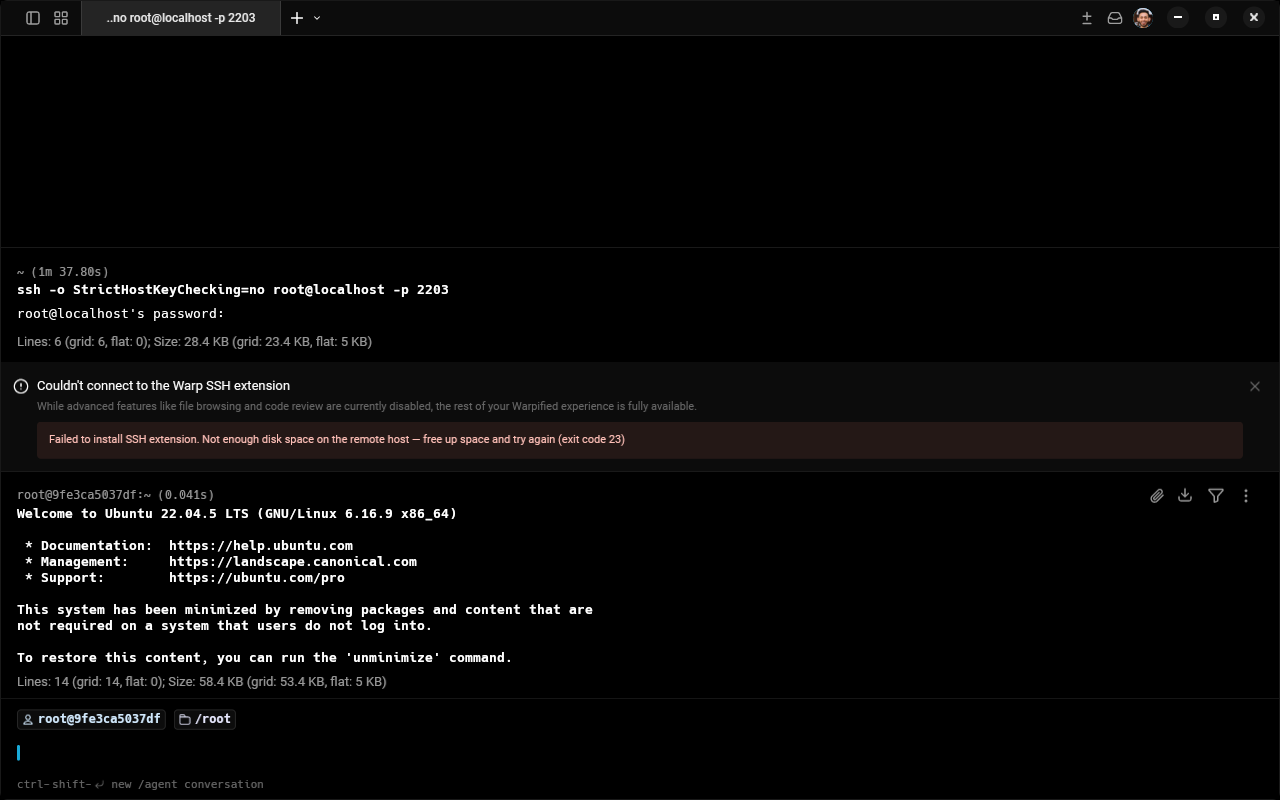
Screenshots: Improved Error MessagesDisk FullWhen SSH extension install fails because the remote host runs out of disk space: Before: Raw stderr like
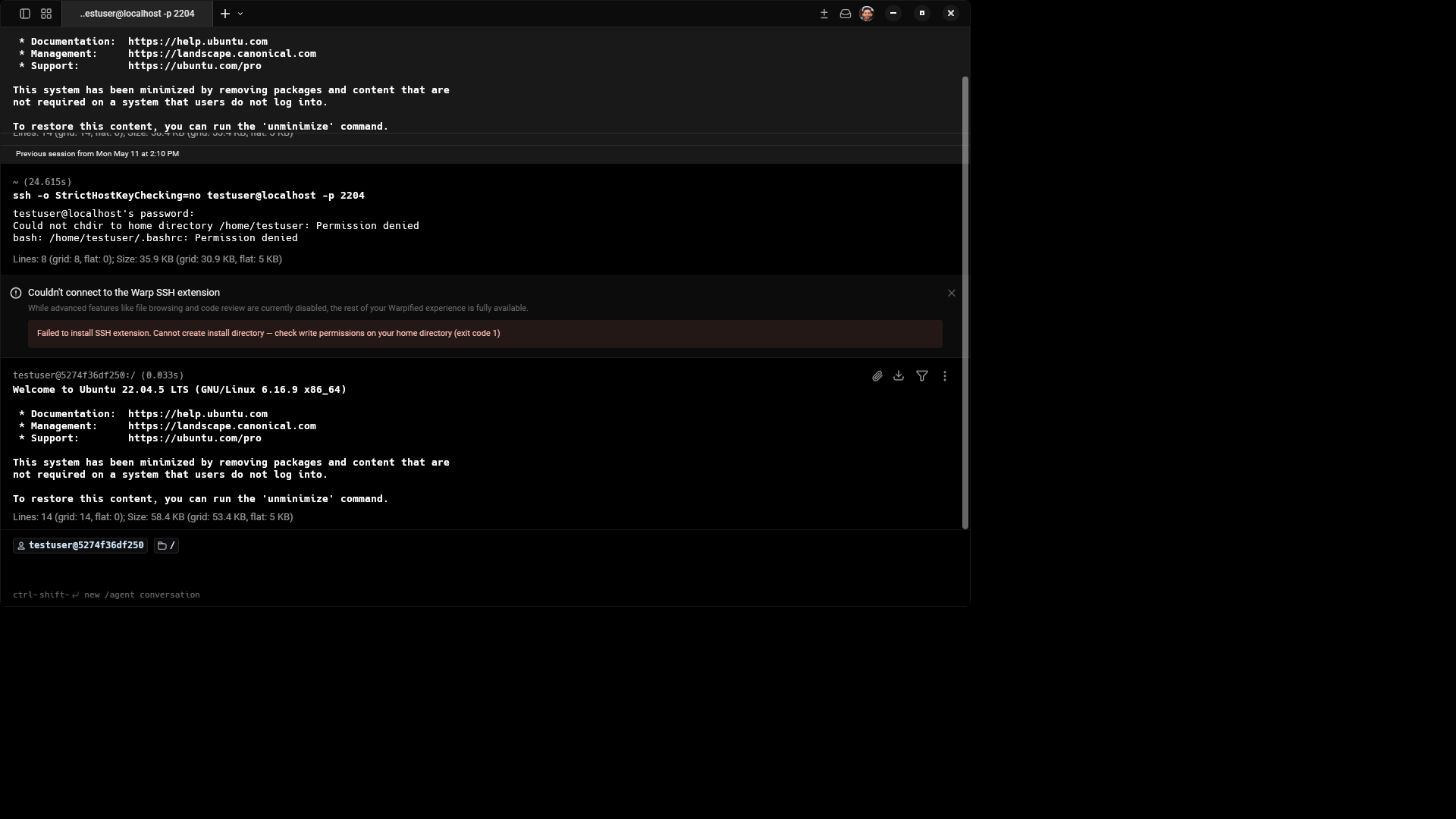
Permission DeniedWhen the user's home directory is read-only and Before: Raw stderr like
Reproduced using Docker containers: 5MB tmpfs for disk-full, |
1 participant

Description
Problem: When the remote server install fails due to permission denied, disk full, SSH disconnect, or unsupported architecture, users see a generic "Script exited with code N: " message. The raw stderr is often hundreds of characters of curl progress bars or tar errors, making it hard to understand what went wrong or how to fix it.
Solution: Pattern-match stderr content in
Error::user_facing_error()to detect 4 common failure modes and produce actionable messages:Script exited with code 1: mkdir: cannot create directory...Cannot create install directory — check write permissions on your home directoryScript exited with code 2: tar: No space left on device...(hundreds of lines)Not enough disk space on the remote host — free up space and try againScript exited with code 255:(empty)SSH connection was lost during installation — please reconnect and try againScript exited with code 2: unsupported arch: armv7lThis remote host uses a armv7l processor, which is not supported. Warp SSH extension requires x86_64 or aarch64 (arm64).Unrecognized errors fall through to the existing truncated-stderr format.
Linked Issue
ready-to-specorready-to-implement.Testing
Unit tests (all passing):
cargo test -p remote_server -- transport::tests— 12 passed, 0 failedcargo fmt/cargo clippy— cleanNew tests (12 total):
script_failed_permission_denied_produces_targeted_messagescript_failed_read_only_fs_produces_targeted_messagescript_failed_disk_full_produces_targeted_messagescript_failed_curl_write_failure_produces_disk_full_messagescript_failed_ssh_disconnect_produces_targeted_messagescript_failed_ssh_disconnect_only_whitespace_stderrscript_failed_ssh_255_with_stderr_uses_defaultscript_failed_unsupported_arch_produces_targeted_messagescript_failed_default_format_for_unrecognised_errorscript_failed_truncates_long_stderr_in_default_formatscript_failed_body_reflects_stagetimed_out_error_message/other_error_has_no_detailImpact: Addresses permission denied (4.5%), disk full (3.7%), SSH disconnect (1.6%), unsupported arch (3.2%) — ~13% of errors get improved messages.
./script/runAgent Mode
Co-Authored-By: Oz oz-agent@warp.dev
CHANGELOG-IMPROVEMENT: Improved error messages for SSH extension install failures (permission denied, disk full, SSH disconnect)