
Replies: 1 comment 2 replies

\documentclass[zihao=-4]{ctexart}
\usepackage{tabularray}
\usepackage{xcolor}

\begin{document}
\subsection*{Set table rowsep to obey text line skip}
\begin{tblr}{colspec={Q[l,h]Q[l,h]}, rowsep=0pt, hlines,
  cell{3}{1}={fg=blue!75}
}
  国国国 & 国国国\\
  国国国 & 国国国\\
  实验组 & {国国国\\ 国国国\\ 国国国}\\
  国国国 & 国国国\\
  国国国 & 国国国\\
\end{tblr}%
\space
\begin{tblr}{colspec={Q[l,h]Q[l,h]}, rowsep=0pt,
  cell{3}{1}={fg=blue!75}
}
  \hline
  国国国 & 国国国\\ \hline
  国国国 & 国国国\\ \hline
  对照组 & 国国国\\
        & 国国国\\
        & 国国国\\ \hline
  国国国 & 国国国\\ \hline
  国国国 & 国国国\\ \hline
\end{tblr}\par

\subsection*{Set text line skip to obey table rowsep}
%        rowsep = 2pt by default
% \baselineskip = 12bp * (72.27/72) pt/bp * 1.2 * 1.3 = 18.7902pt,
%                 where 1.3 is the linespread set by ctex
\makeatletter
\begin{tblr}{colspec={Q[l,h]Q[l,h]}, hlines,
  cells={font=\addtolength\baselineskip{4pt}\selectfont},
  cell{3}{1}={fg=blue!75}
}
  国国国 & 国国国\\
  国国国 & 国国国\\
  实验组 & {国国国\\ 国国国\\ 国国国}\\
  国国国 & 国国国\\
  国国国 & 国国国\\
\end{tblr}%
\space
\begin{tblr}{colspec={Q[l,h]Q[l,h]},
  cell{3}{1}={fg=blue!75}
}
  \hline
  国国国 & 国国国\\ \hline
  国国国 & 国国国\\ \hline
  对照组 & 国国国\\
        & 国国国\\
        & 国国国\\ \hline
  国国国 & 国国国\\ \hline
  国国国 & 国国国\\ \hline
\end{tblr}\par
\end{document}
|
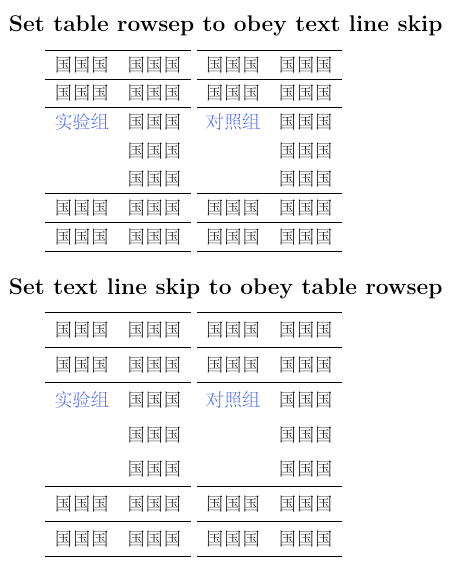
2 replies

|
Thank you very much, your ideas can solve my problem. I have achieved the desired effect according to your method. |

|
By the way, |
Sign up for free
to join this conversation on GitHub.
Already have an account?
Sign in to comment


Uh oh!
There was an error while loading. Please reload this page.
In the following table example, how can the spacing of the four parts of red, yellow, blue and green be consistent? Tried many methods, but failed to achieve the desired effect. In short, just looking at the second column has the same effect as a paragraph with 20pt line spacing.
All reactions