

dotnet new -i MSBuild.SDK.SystemWeb.TemplatesOptionally
dotnet new --update-checkand
dotnet new --update-applyN.B. This applies to all installed templates.
dotnet new -i MSBuild.SDK.SystemWeb.TemplatesShould update you to the latest version even if you have them already installed.
dotnet new systemwebor
dotnet new systemwebfullTo select the VB.Net version use the flag -lang VB
e.g.
dotnet new systemweb -lang VBdotnet new systemwebor
dotnet new systemwebfullTo select the VB.Net version use the flag -lang VB
e.g.
dotnet new systemweb -lang VBdotnet new systemwebrazorlibTo select the VB.Net version use the flag -lang VB
e.g.
dotnet new systemwebrazorlib -lang VBAlternatively use the Visual Studio Add Project dialog. You need to have enabled the Preview feature to show .NET CLI Templates in Visual Studio and have Visual Studio 16.8 Preview 2 or higher.
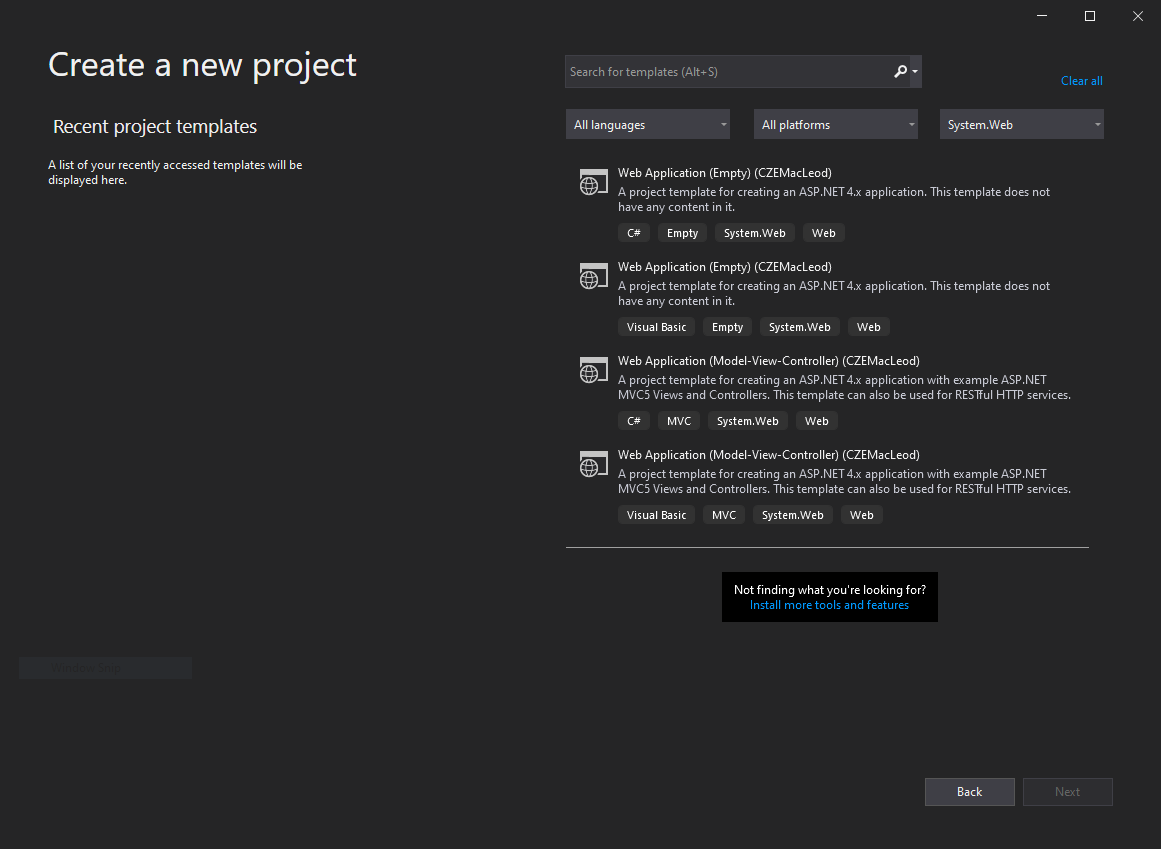
You can find the new templates easily by selecting System.Web from the Project Type dropdown.
Same as VS2019 except the feature should automatically be enabled as it is no longer in preview.